







Lexington Public Library

Website Search

Search Website
Displaying results 26 - 50 of 56
Podcast
Authored on
Feeds item
Fri, 11/25/2022 - 11:09am

Stories of Lexington's history told through the Kentucky Room archives.

Embroidery machine

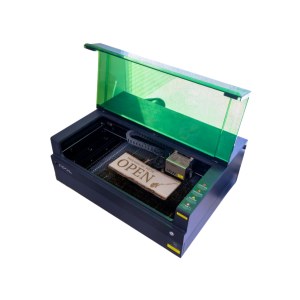
Laser engraver

Engraver size varies by location. Cut wood or engrave on wood, metal, stone, leather, glass and more. 

The Eastside Makerspace machine can hold items up to 19.6 x 12.5 x 5 inches. The Marksbury Family Branch Makerspace machine can hold smaller items like coasters and keychains up to 4.53 x 4.53 inches. Some items are available to purchase in the space, including keychains, business cards, coasters, and bookmarks.
Visit the following learning spaces to get started.

Laser engraver
Embroidery machine

Audio booth

Audio booths are outfitted with a microphone, computer, headphones, and other recording equipment and software. 

Musical instruments are available at the Northside Digital Studio audio booth. 32 GB flash drives are available for purchase at the Digital Studio, but you may need to bring additional storage depending on the size of the project.  

Visit the following learning spaces to get started.

Audio booth
Embroidery machine

Cricut machines

Cricut machines can cut 12 x 24-inch vinyl, fabric, and paper products. 12 x 12-inch transfer tape, permanent vinyl, and heat transfer vinyl are available for purchase, or you can use your own materials free of charge. Speak with a staff member before use if you are bringing your own materials. 

Visit the following learning spaces to get started.

Cricut machine
Embroidery machine

Button makers

Make buttons and magnets using equipment and supplies available in the Makerspace.

The Eastside Makerspace offers 1.25” and 2.25” button makers for buttons and magnets. The Marksbury Family Branch Makerspace offers 2.25” button makers for buttons and magnets and 1” button makers for keychains, earrings, and paperclip bookmarks. Button, magnet keychain, earring, and bookmark materials are available to purchase.

Visit the following learning spaces to get started.

Button maker